 Pellaeon
Pellaeon Classic: for UCSF Chimera 1.x
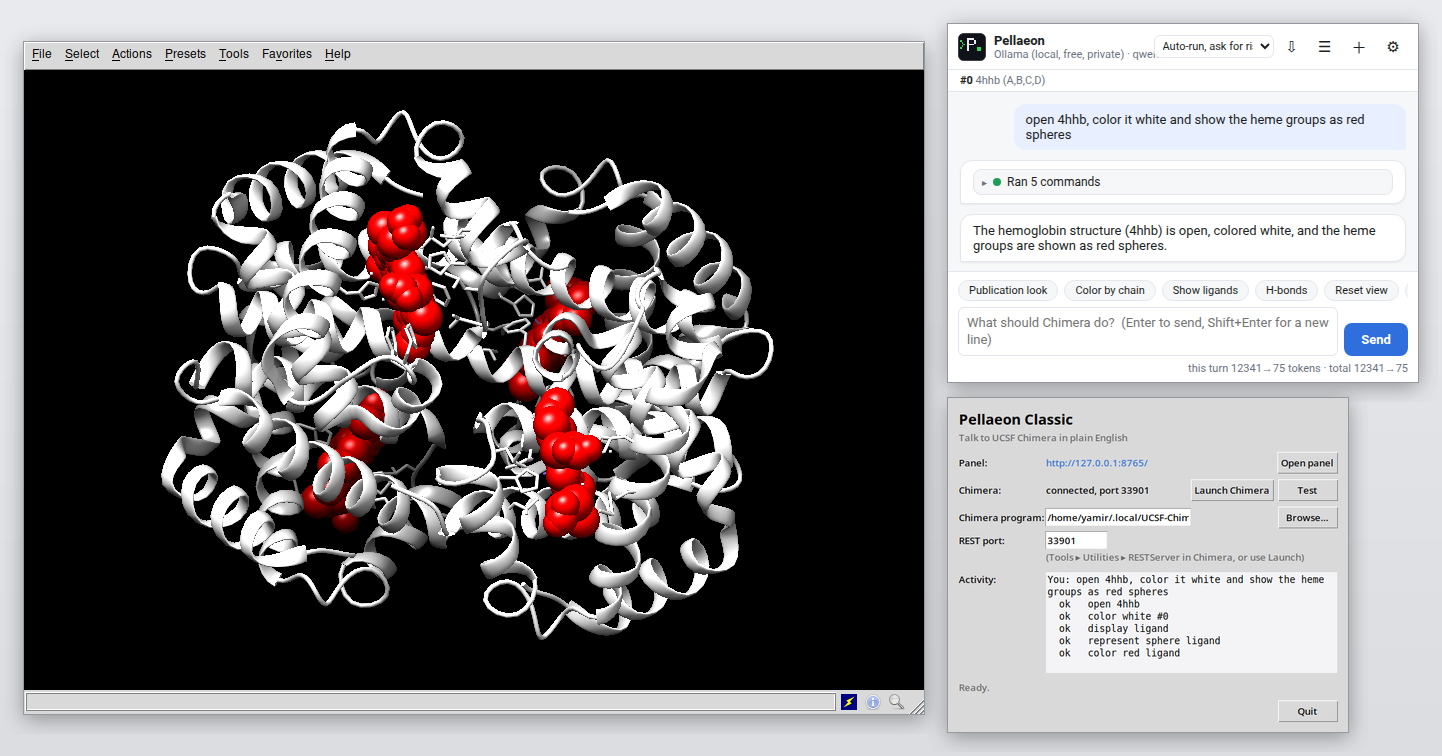
The same assistant, for the classic Chimera. Because Chimera 1.x runs Python 2 and Tk, Pellaeon Classic is a small
separate program: it serves the Pellaeon panel to your web browser and drives Chimera through Chimera's built-in
REST server. It shares the agent, providers, safety gate and UI with the ChimeraX bundle; only the executor and
the command knowledge (Chimera's Midas-style syntax, models numbered from #0, :10.A chains) differ.
Install and run
- Python 3.9 or newer (python.org; on Windows tick "Add Python to PATH"). Nothing else to install.
- Download
pellaeon-classic.zipfrom the releases page and unzip it anywhere. - Windows: double-click Start Pellaeon Classic.cmd. macOS: double-click Start Pellaeon Classic.command. Linux:
./start.sh. A small launcher window opens (panel address, Chimera status, Launch Chimera, Test, activity log) and your browser opens the Pellaeon panel athttp://127.0.0.1:8765. - Press Launch Chimera in the launcher (it starts Chimera with
--start RESTServerand picks up the port automatically; the executable is auto-detected inC:\Program Files\Chimera*,/Applications/Chimera*.app,~/.local/UCSF-Chimera*, or use Browse…). Or start Chimera yourself, open Tools ▸ Utilities ▸ RESTServer, type the port from its Reply Log and press Test. - In the browser panel choose an AI provider once (same settings page as the ChimeraX edition), then type requests.
- Optional:
python install.pyputs a Pellaeon Classic shortcut on the desktop and in the Start menu (Windows), a.commandon the desktop (macOS) or an applications-menu entry (Linux).
python run.py --console runs without the launcher window (terminal only); --no-browser skips opening the browser.
Differences from the ChimeraX edition
- Commands use Chimera syntax (
color red :10,display,~ribbon,focus,turn y 1 360,background solid white). - AlphaFold models open from the EBI URL (
open https://alphafold.ebi.ac.uk/files/AF-<accession>-F1-model_v4.pdb). - No Python execution, no per-residue displacement coloring in compare (RMSD from matchmaker only).
- Chat exports are
.cmdChimera command files;copy file(images),save,close,delete,systemask first. - Syntax lookups use the bundled Chimera documentation (Chimera has no
usagecommand). - Both editions share the chat interface and model providers. It also knows what is open and selected (via
list modelsandlist selection), and by default closing models, deleting atoms, saving files and running scripts require confirmation.
These are ChimeraX-edition only:
- table overlays (painting a per-residue CSV onto a structure)
- contact comparison (which contacts and salt bridges are lost and gained between two conformations)
- figure bundles (image, session, command script, color table and draft legend in one folder)
- label tidying (moving overlapping labels apart)
- screenshot review (the model looks at the view and fixes framing, clutter and colors)
Tested with Chimera 1.20.