 Pellaeon

New Pellaeon is in the ChimeraX Toolshed
Talk to ChimeraX in plain English.
Open structures, inspect residues, compare models, and make figures from a chat panel inside ChimeraX. See the commands Pellaeon runs and copy or reuse them.
toolshed install ChimeraX-Pellaeon
Paste into ChimeraX's command line, or install it from Tools ▸ More Tools… without typing anything. Other ways to install

Three steps
- Install the panel. Paste the line above into ChimeraX's command line, or open Tools ▸ More Tools… and press Install next to Pellaeon. Details
- Connect a model. Sign in with a ChatGPT account, paste a key for a cloud provider, or point Pellaeon at Ollama on your computer. Local or cloud
- Run the built-in test request. A button on the settings page opens ubiquitin and colors it by chain.
Setup steps: install guide. Choosing a local or cloud model: model guidance. With the default confirmation setting, file writes and destructive actions wait for your approval.
How it works
Pellaeon uses your current session and ChimeraX documentation to turn requests into commands. Each command is shown, and errors are returned to the model for correction.
Using Claude Desktop or Cursor with ChimeraX's own mcp command? How the two differ, and how they work together.
Where it fails
The model works from the session state and the log; it does not see the 3D view. Small local models pick the wrong chain, hide what they just showed, or answer a question by running commands. A specific request ("color chain B of #2 red") does better than a general one. Every command is shown, so a wrong one is easy to spot, and Undo takes the last request back. Scores by model are on the tested models page.
Reading a command
Every reply shows the ChimeraX commands it ran. Tap or focus on a part to see what it means.
model 1, chain A, residue 113, colored blue
What you can do
Explore a structure
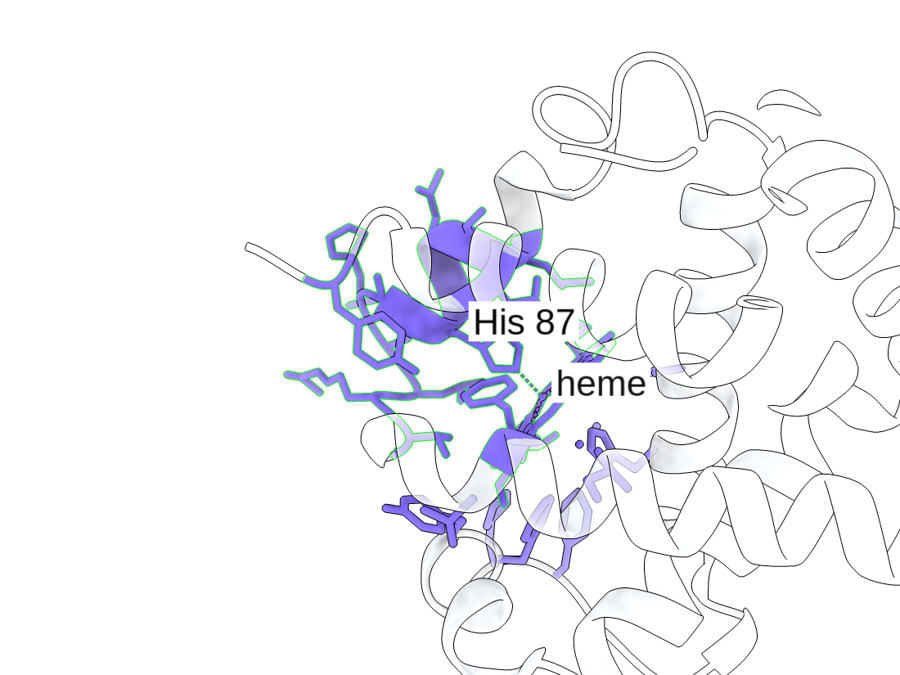
Ask which structures exist for a protein and open the best-resolved one. Select a residue, inspect its neighbours, measure distances, or add annotations.
Compare conformations
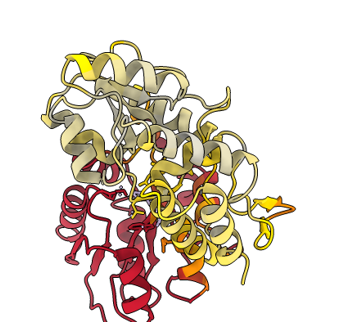
Superpose structures and inspect residue displacements and contact differences.
Map your data
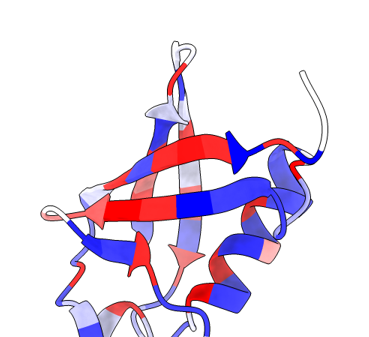
Import a residue-score table, check its numbering, and color the structure by value or category.
Save figures and views
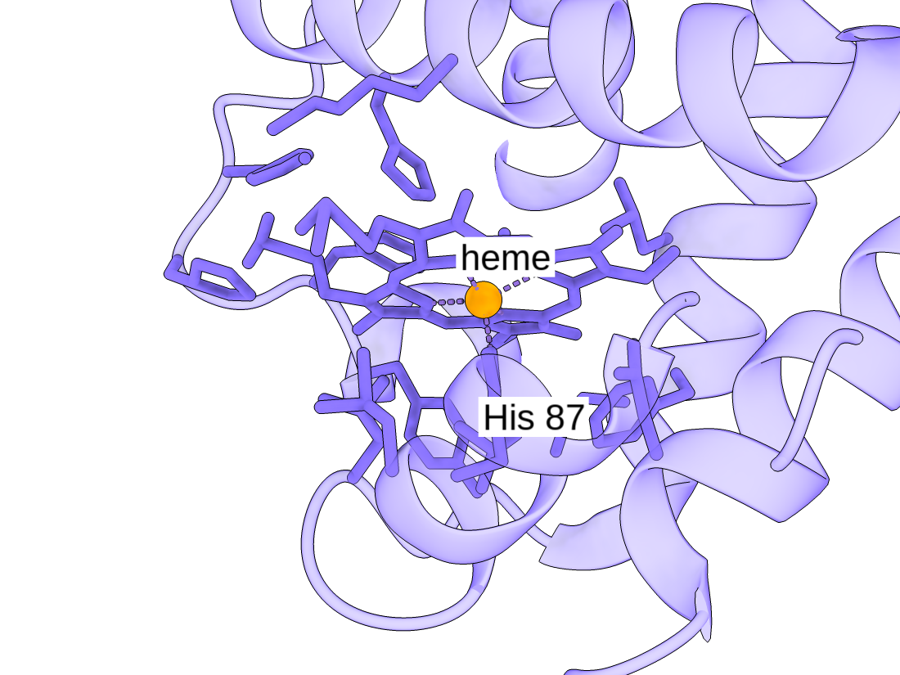
Export images with their recorded commands and sources. Save views and reuse figure styles.
See it work
Recorded in ChimeraX with the panel. Choose an example, then play or stop the recording.
Follow this guide · Get the example files · Open full size
Details
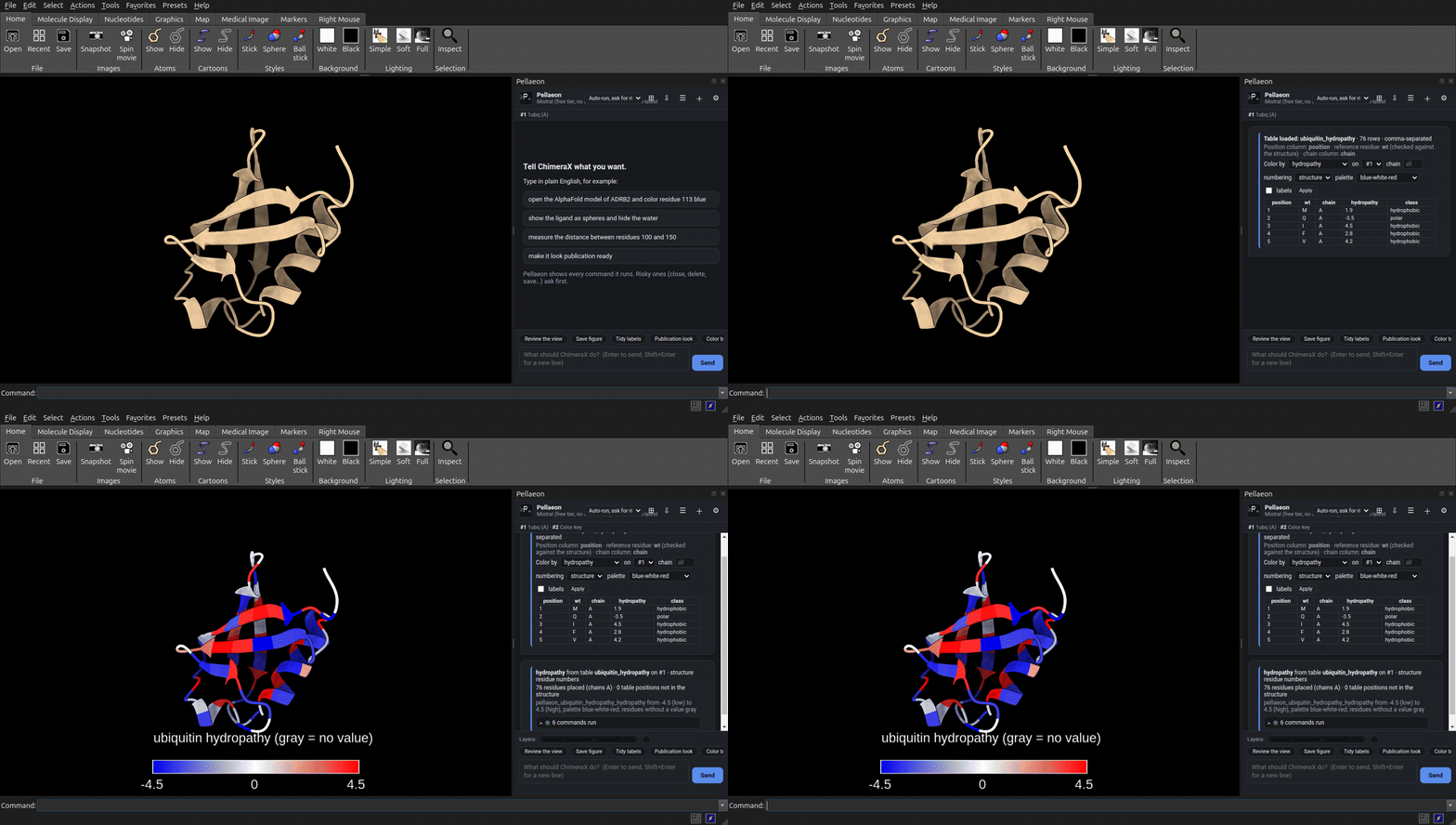
Loaded docs/examples/ubiquitin_hydropathy.csv through the panel's Import table action on 1ubq, then used the preview card's Apply to color chain A by the hydropathy column.
All 76 table rows are placed on chain A with 0 positions missing and no reference mismatches, and the structure turns blue-to-red by Kyte-Doolittle hydropathy under a key and title that sit clear of it; the camera does not move, so the colour is the only thing that changes.
Selected commands
color byattribute r:pellaeon_ubiquitin_hydropathy_hydropathy #1 palette blue:white:red range -4.5,4.5 target ac novalue gray
key delete
key blue:-4.5 white:0 red:4.5 pos 0.30,0.075 size 0.40,0.04 fontSize 20
2dlabels create pellaeon_title text "ubiquitin hydropathy (gray = no value)" xpos 0.30 ypos 0.165 size 20 color white
view #1
zoom 0.85
Follow this guide · Get the example files · Open full size
Details
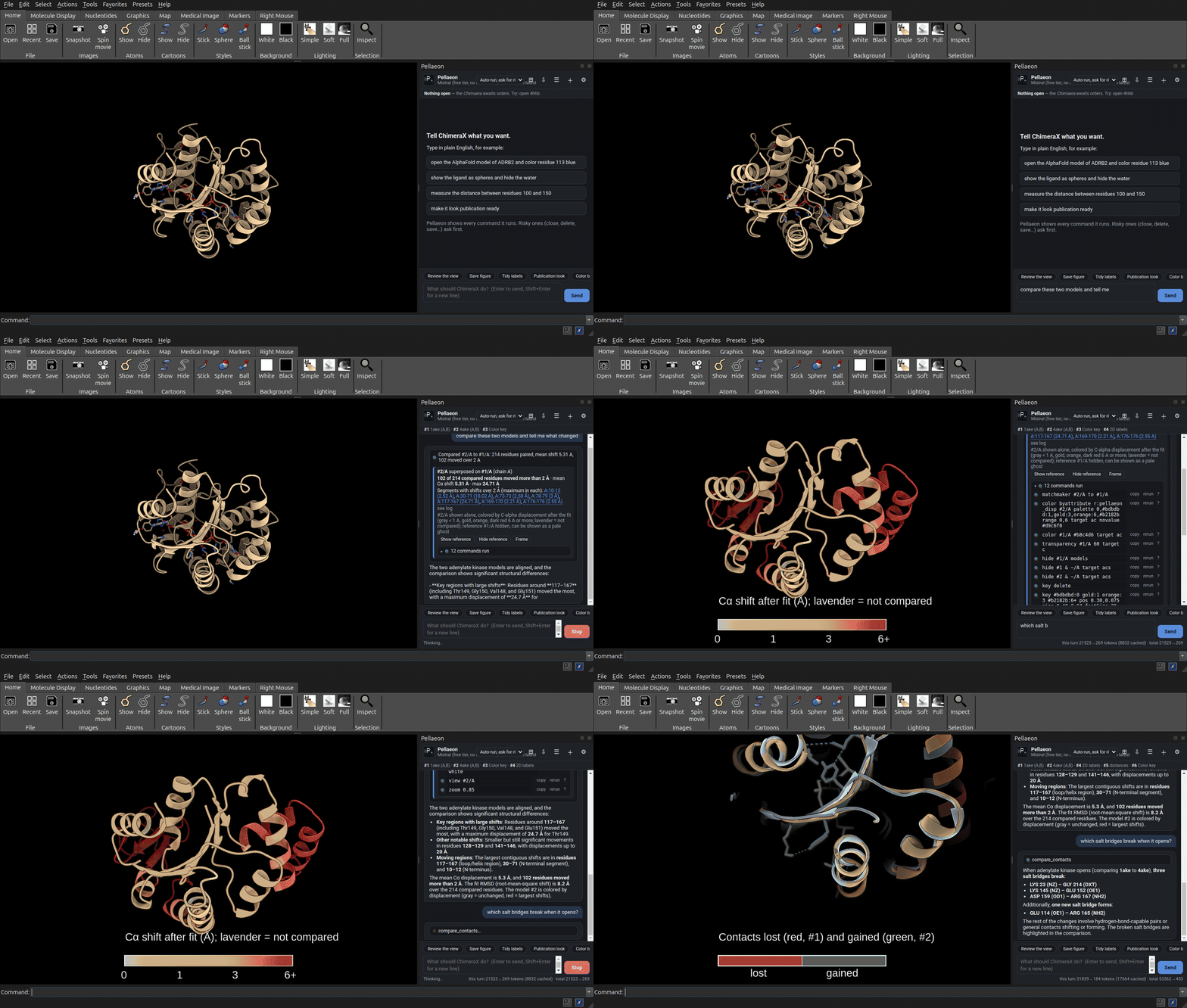
"compare these two models and tell me what changed" then "which salt bridges break when it opens?" (on adenylate kinase, closed 1ake vs. open 4ake, chain A; the second copy of each dimer is hidden)
102 of the 214 paired residues move more than 2 A (mean 5.3 A, maximum 24.7 A in the 117-167 loop), and of the interactions that change, three salt bridges break (LYS 23-GLY 214, LYS 145-GLU 152, ASP 159-ARG 167) while one forms (GLU 114-ARG 165); the broken contacts are drawn as red dashes on the closed model and the new ones green on the open one, first fitted whole and then close in on LYS 23-GLY 214.
Selected commands
matchmaker #2/A to #1/A
color byattribute r:pellaeon_disp #2/A palette 0,#bdbdbd:1,gold:3,orange:6,#b2182b range 0,6 target ac novalue #d9c6f0
color #1/A #b8c4d6 target ac
transparency #1/A 60 target c
hide #1/A models
hide #1 & ~/A target acs
hide #2 & ~/A target acs
key delete
key #bdbdbd:0 gold:1 orange:3 #b2182b:6+ pos 0.30,0.075 size 0.40,0.04 fontSize 20
2dlabels create pellaeon_title text "Cα shift after fit (Å); lavender = not compared" xpos 0.30 ypos 0.165 size 20 color white
view #2/A
zoom 0.85
matchmaker #2/A to #1/A
show #1 models
show #2 models
hide #1 & ~/A target acs
hide #2 & ~/A target acs
transparency #1 55 target c
transparency #2 55 target c
distance delete
show #1/A:8,10,12,13,14,15,16,17,18,23,31,36,39,40,58,61,84,85,88,89,119,121,122,123,132,145,152,156,159,167,170,171,175,176,198,214 atoms
color #1/A:8,10,12,13,14,15,16,17,18,23,31,36,39,40,58,61,84,85,88,89,119,121,122,123,132,145,152,156,159,167,170,171,175,176,198,214 #b2182b target a
distance #1/A:23@NZ #1/A:214@OXT color #b2182b dashes 6 radius 0.08
distance #1/A:145@NZ #1/A:152@OE1 color #b2182b dashes 6 radius 0.08
distance #1/A:159@OD1 #1/A:167@NH2 color #b2182b dashes 6 radius 0.08
distance #1/A:8@O #1/A:13@NZ color #b2182b dashes 6 radius 0.08
distance #1/A:10@O #1/A:119@NH1 color #b2182b dashes 6 radius 0.08
distance #1/A:12@O #1/A:16@N color #b2182b dashes 6 radius 0.08
distance #1/A:13@O #1/A:17@N color #b2182b dashes 6 radius 0.08
distance #1/A:14@O #1/A:18@N color #b2182b dashes 6 radius 0.08
distance #1/A:15@O #1/A:18@N color #b2182b dashes 6 radius 0.08
distance #1/A:18@OE1 #1/A:132@N color #b2182b dashes 6 radius 0.08
distance #1/A:31@N #1/A:84@O color #b2182b dashes 6 radius 0.08
distance #1/A:31@OG1 #1/A:85@O color #b2182b dashes 6 radius 0.08
distance #1/A:36@O #1/A:39@N color #b2182b dashes 6 radius 0.08
distance #1/A:36@O #1/A:40@N color #b2182b dashes 6 radius 0.08
distance #1/A:36@NH1 #1/A:156@CZ color #b2182b dashes 6 radius 0.08
distance #1/A:58@N #1/A:170@OE1 color #b2182b dashes 6 radius 0.08
distance #1/A:61@OD1 #1/A:89@OG1 color #b2182b dashes 6 radius 0.08
distance #1/A:88@O #1/A:175@OG1 color #b2182b dashes 6 radius 0.08
distance #1/A:119@O #1/A:121@N color #b2182b dashes 6 radius 0.08
distance #1/A:119@O #1/A:122@N color #b2182b dashes 6 radius 0.08
distance #1/A:119@O #1/A:123@N color #b2182b dashes 6 radius 0.08
distance #1/A:119@NH2 #1/A:198@O color #b2182b dashes 6 radius 0.08
distance #1/A:123@NH2 #1/A:156@NH1 color #b2182b dashes 6 radius 0.08
distance #1/A:171@O #1/A:176@N color #b2182b dashes 6 radius 0.08
show #2/A:1,3,5,6,8,25,31,45,46,47,48,49,50,51,52,79,84,85,88,105,107,113,114,116,117,118,132,138,141,143,159,161,165,175,176,179,180,193,195,213 atoms
color #2/A:1,3,5,6,8,25,31,45,46,47,48,49,50,51,52,79,84,85,88,105,107,113,114,116,117,118,132,138,141,143,159,161,165,175,176,179,180,193,195,213 #1a9850 target a
distance #2/A:114@OE1 #2/A:165@NH2 color #1a9850 dashes 6 radius 0.08
distance #2/A:5@O #2/A:85@N color #1a9850 dashes 6 radius 0.08
distance #2/A:25@O #2/A:79@ND2 color #1a9850 dashes 6 radius 0.08
distance #2/A:31@OG1 #2/A:88@NH2 color #1a9850 dashes 6 radius 0.08
distance #2/A:45@O #2/A:48@N color #1a9850 dashes 6 radius 0.08
distance #2/A:45@O #2/A:49@N color #1a9850 dashes 6 radius 0.08
distance #2/A:46@O #2/A:50@N color #1a9850 dashes 6 radius 0.08
distance #2/A:47@O #2/A:51@OD2 color #1a9850 dashes 6 radius 0.08
distance #2/A:48@O #2/A:52@N color #1a9850 dashes 6 radius 0.08
distance #2/A:113@O #2/A:117@N color #1a9850 dashes 6 radius 0.08
distance #2/A:114@O #2/A:117@N color #1a9850 dashes 6 radius 0.08
distance #2/A:114@O #2/A:118@N color #1a9850 dashes 6 radius 0.08
distance #2/A:132@O #2/A:138@ND2 color #1a9850 dashes 6 radius 0.08
distance #2/A:141@O #2/A:143@N color #1a9850 dashes 6 radius 0.08
distance #2/A:159@O #2/A:161@N color #1a9850 dashes 6 radius 0.08
distance #2/A:175@O #2/A:179@N color #1a9850 dashes 6 radius 0.08
distance #2/A:176@O #2/A:180@N color #1a9850 dashes 6 radius 0.08
distance #2/A:193@OH #2/A:195@NZ color #1a9850 dashes 6 radius 0.08
distance #2/A:1@SD #2/A:105@CE1 color #1a9850 dashes 6 radius 0.08
distance #2/A:1@CE #2/A:213@O color #1a9850 dashes 6 radius 0.08
distance #2/A:3@CG2 #2/A:107@CD1 color #1a9850 dashes 6 radius 0.08
distance #2/A:5@O #2/A:84@C color #1a9850 dashes 6 radius 0.08
distance #2/A:6@CD1 #2/A:179@CD1 color #1a9850 dashes 6 radius 0.08
distance #2/A:8@CB #2/A:116@CD1 color #1a9850 dashes 6 radius 0.08
key delete
key #b2182b:lost #1a9850:gained colorTreatment distinct pos 0.30,0.075 size 0.40,0.04 fontSize 20
label delete pseudobonds
2dlabels change pellaeon_title text "Contacts lost (red, #1) and gained (green, #2)" xpos 0.30 ypos 0.165 size 20 color white
view #1/A #2/A
zoom 0.85
Two editions
The ChimeraX edition is a native bundle with a docked panel (install it); the classic edition drives UCSF Chimera 1.x through its REST server and shows the panel in your browser (classic edition). Both editions share the chat interface and model providers. Table overlays and some analysis tools are ChimeraX-only: see the feature differences.
Privacy
With a local Ollama server, model requests are processed on your computer. Fetching structures and annotations still contacts external databases (PDB, AlphaFold DB, 3D-Beacons, UniProt, ClinVar, ConSurf-DB). With a cloud provider, your request, the list of open models, the current selection, the commands you ran by hand in ChimeraX since your previous request (with their output) and any table you loaded are sent to that provider. Screenshots are shared only when the review-the-view option is enabled in Settings.
Command corrections Pellaeon learns (a refused command and the one that ran instead) stay in learned.json on your computer; sharing them with the project is a button you press, and nothing is sent otherwise. Keys are stored on your computer, never in ChimeraX sessions. Privacy detail, including the free tiers · Where things are stored